Dussehra AI Photo Editing Prompts 2026: Copy Paste

When the Ravana effigies go up in every ground, the photo race begins. These dussehra ai photo editing prompts let you join it with nothing more than one clear selfie and a free AI app. Copy a dussehra photo editing prompt from below, paste it into Gemini or ChatGPT with your photo, and you get a festive portrait with firelight, traditional dress and a celebration behind you, while your face stays exactly your own.
Why the Whole Feed Turns Festive That Week
Dussehra, or Vijayadashami, marks the victory of good over evil: Lord Rama’s win over Ravana and Goddess Durga’s triumph after the nine nights of Navratri. That story is a gift for photos. Fire, fireworks, royal-looking outfits and deep night colours are already dramatic before any editing begins.
It also helps that the festival sits inside a packed October. The same creators planning Dussehra posts are finishing their karwa chauth ai photo editing prompts for the same stretch, and many reuse their favourite looks from the navratri ai photo editing prompts collection, changing only the background from garba lights to the Dahan ground. Festival portraits earn saves and status shares, so two or three good edits posted across the week can do more than a month of regular photos.
Start With the Family Frame
Not every Dussehra post has to be a solo hero shot. This first dussehra ai photo prompt builds a warm family picture, the kind relatives forward on WhatsApp all morning. It works best with a photo where all three people are clearly visible.

The Mirror-Work Outfit at the Fairground
Prompt two goes full celebration: a traditional outfit with mirror work and golden embroidery, a decorated pillar, and the towering effigy with fireworks behind you. This is the classic full-body poster style that performs best as a profile picture during the festival.

Holding the Bow Like Lord Ram
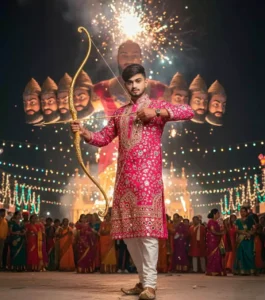
The bow pose is the most shared Dussehra look of all, because it connects your portrait straight to the story of the day. Keep your expression confident and let the prompt handle the arrow, the crowd and the burning effigy.
The Hero Pose, Bow in One Hand
The fourth version keeps the same royal outfit but changes the stance, bow lowered in one hand and arrow in the other. If the drawn-bow result made your hands look odd, this pose is usually kinder to fingers and easier for the AI to render cleanly.

Happy with a prompt? Open the image editor below, upload your photo, paste and generate. Make two or three versions today and keep the best ones ready for the festival morning.
Little Wording Habits That Keep an Edit Believable
Small lines inside a prompt decide whether the result looks like a photograph or a poster from a game. The habits in this table come from testing these edits again and again, and they apply to every festive prompt, the same way anyone who has made a mahadev ai photo editing prompt portrait learns quickly that the face line is the one line you never delete.
| Tip | Why it works |
|---|---|
| Always write “keep my face exactly the same” | Stops the AI from beautifying or changing your features |
| Mention “realistic skin texture” in every prompt | Prevents the smooth, plastic look AI portraits often get |
| Name 2–3 outfit colors, not just “traditional” | Specific colors give the AI clear direction and richer detail |
| Add one light source (“firelight on my face”) | A defined light source makes shadows and glow look natural |
| Keep backgrounds slightly blurred | Blur hides AI mistakes in crowds and keeps focus on you |
| Generate at night scene settings for Dahan shots | Fire and fireworks only look dramatic against dark skies |
When the Result Looks Off, Fix It in This Order
Do not rewrite the whole prompt when something goes wrong. Find the problem in this table, apply its one-line fix, and generate again. Most edits are saved by the second or third try.
| Problem | Quick fix |
|---|---|
| Face looks like a different person | Upload a clear front-facing photo and repeat “do not alter facial features” |
| Hands look distorted near diyas | Ask for “natural hands” and keep hands away from the face in the prompt |
| Too many people appear in the background | Add “no extra people” or “clean background” to the prompt |
| Colors look washed out | Request “warm festive lighting” and “rich saturated colors” |
| Text or watermarks appear on the image | Add “no text, no watermark” at the end of your prompt |
| Edit looks cartoonish | Include “photorealistic” and “ultra-detailed” in every prompt |
Once the edit looks right, the finishing step most creators use is colour. A warm grade settles firelight into skin tones, and the moody cinematic lightroom presets give exactly that deep festive glow without re-editing from scratch. If you shoot video as well, the matching dussehra capcut template turns the same celebration footage into a ready reel.
Dussehra Edit Questions Readers Keep Asking
Do these prompts work for girls’ festive outfits too?
Yes. Keep the face-protection lines untouched and change only the outfit description, for example a chaniya choli or a silk saree with oxidised jewellery, plus diyas in hand if you want a softer scene. The background and lighting lines stay the same.
Can I put five family members into one Dussehra edit?
You can, but use a group photo where every face is clear and facing the camera. AI handles two or three people most reliably. With bigger groups, check every face after generating, because the last faces in a row are where features get mixed up.
My result looks good on the phone but blurry when I zoom. Why?
The free versions of these apps export at a limited size. Generate at the largest size the app offers, download the file instead of screenshotting it, and avoid cropping tightly afterwards, since cropping stretches the same pixels further.
Can I write the prompt in Hinglish instead of English?
Short Hinglish lines do work in Gemini, and many creators use them for background descriptions. For the face and outfit lines, English still gives more predictable results, so a mixed prompt, English for the person and Hinglish for the scene, is a safe middle path.
The burning effigy came out too close and scary. How do I fix that?
Add the words “far in the background” and “safe distance” next to the effigy line, and ask for a slightly blurred background. The fire stays dramatic, but the portrait stops looking like you are standing inside the Dahan ground.