Dussehra AI Photo Editing Prompts 2026 | Jai Shri Ram
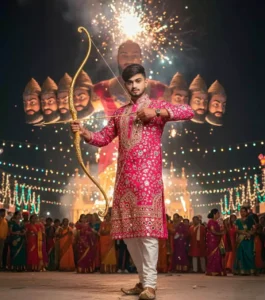
Dussehra is almost here, and feeds everywhere are about to fill with burning Ravana effigies, glowing diyas, and festive portraits. The Dussehra AI Photo Editing Prompts 2026 in this guide let you create those stunning edits from a single selfie no photoshoot, no editing skills needed.
Just copy a prompt, paste it into Gemini or ChatGPT with your photo, and get a share ready Dussehra portrait in seconds. Below you will find 12+ original prompts grouped by style, pro tips for realistic results, and answers to the questions readers ask most.

Why Dussehra Edits Perform So Well on Instagram
Dussehra, also called Vijayadashami, celebrates the victory of good over evil Lord Rama’s triumph over Ravana, and Goddess Durga’s victory after nine nights of Navratri. That story gives creators powerful visual material: fire, royal costumes, dramatic night lighting, and deep festive colors.
Posts with Ravana Dahan backgrounds and traditional attire consistently get more saves and shares during the festival week, because people love reposting them as status updates and story wishes.
October is packed anyway Karwa Chauth lands in the same festive stretch, and plenty of creators are planning their Karwa Chauth edits right alongside these.
12+ Copy Paste Dussehra AI Photo Editing Prompts



Pro Tips for Realistic AI Edits
Small wording choices decide whether your edit looks real or fake. Check this table before generating:
| Tip | Why it works |
|---|---|
| Always write “keep my face exactly the same” | Stops the AI from beautifying or changing your features |
| Mention “realistic skin texture” in every prompt | Prevents the smooth, plastic look AI portraits often get |
| Name 2–3 outfit colors, not just “traditional” | Specific colors give the AI clear direction and richer detail |
| Add one light source (“firelight on my face”) | A defined light source makes shadows and glow look natural |
| Keep backgrounds slightly blurred | Blur hides AI mistakes in crowds and keeps focus on you |
| Generate at night scene settings for Dahan shots | Fire and fireworks only look dramatic against dark skies |
It is the same habit that makes every deity portrait work, really anyone who has tried a Lord Shiva edit knows the face has to stay untouched or the whole thing falls apart.
Mistakes That Ruin AI Edits
| Problem | Quick fix |
|---|---|
| Face looks like a different person | Upload a clear front-facing photo and repeat “do not alter facial features” |
| Hands look distorted near diyas | Ask for “natural hands” and keep hands away from the face in the prompt |
| Too many people appear in the background | Add “no extra people” or “clean background” to the prompt |
| Colors look washed out | Request “warm festive lighting” and “rich saturated colors” |
| Text or watermarks appear on the image | Add “no text, no watermark” at the end of your prompt |
| Edit looks cartoonish | Include “photorealistic” and “ultra-detailed” in every prompt |
Final Words
Dussehra only comes once a year, and the festival week is the easiest time to grow your reach with content people genuinely want to share. Pick two or three prompts from this guide, generate your edits today, and schedule them across the week leading up to October 20. Once your AI edit is ready, a warm cinematic preset finishes the look the moody cinematic ones give exactly that deep festive glow.
Preset Editors is India’s editing hub for photographers and reels creators, publishing fresh Lightroom presets, CapCut templates, and AI photo prompts every day — bookmark it before the Diwali rush begins.
FAQs
