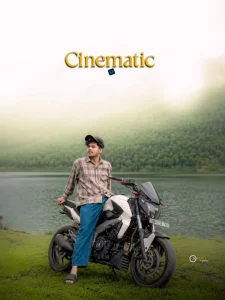
Cinematic Biker AI Photo Editing Prompts | Realistic Bike Edits 2026

A motorcycle shot can look powerful on its own, but the right Cinematic Biker AI Photo Editing Prompts can take the image into a much more dramatic visual style. These prompts can enhance lighting, colors, shadows, background atmosphere, and overall detail while keeping the biker and motorcycle realistic.

Whether the photo is captured on an open road, near a motorcycle, or against an urban background, AI biker photo editing can create a stronger cinematic mood. The key is to add depth and atmosphere while preserving the original face, outfit, bike details, and natural proportions for a realistic final result.

If you enjoy experimenting with different AI editing styles, you can also explore Eye Close Up AI Photo Editing Prompts for another creative portrait concept.

Cinematic Biker AI Photo Editing Prompts

What Are Cinematic Biker AI Photo Editing Prompts?

Cinematic Biker AI Photo Editing Prompts are written instructions that guide an AI photo editor in transforming motorcycle photographs. They can describe the lighting, background, colors, weather, camera style, shadows, and overall atmosphere.

A good prompt can also tell the editor which parts of the original image should remain untouched. Facial features, clothing, motorcycle design, pose, and body proportions can be preserved while the surrounding scene receives a cinematic treatment.

For more creative portrait transformations, Car Mirror Selfie AI Photo Editing Prompts offers another interesting AI editing style to try.

Why Are Cinematic Biker AI Photo Editing Prompts Popular?

Motorcycle photography naturally has a bold and adventurous character. The bike, road, helmet, riding gear, headlights, and surrounding landscape already provide strong visual elements.

Cinematic editing adds another layer by giving these details a specific mood. A simple photograph can become darker, warmer, more dramatic, or more atmospheric depending on the chosen style.

Another reason this type of editing works well is its flexibility. The same motorcycle photograph can be adapted into a night scene, sunset portrait, urban shot, or dramatic road image without requiring complicated manual editing.

Best Cinematic Biker AI Photo Editing Prompts

AI Photo Editing Prompt

A cinematic full-body shot of a young man wearing a vibrant yellow and blue full-face motorcycle helmet, leaning stylishly against a black retro classic motorcycle on an empty paved road. The rider is wearing an oversized white streetwear t-shirt with graphic print, relaxed loose black trousers, and clean white sneakers. The bike’s round vintage headlight is lit with a warm yellow glow. The road is bordered by dense green trees and vibrant bright pink bougainvillea flower bushes. High-contrast lighting with a dramatic bright golden sun flare coming from above, dark moody pavement, professional Lightroom color grading, 85mm portrait lens effect, highly detailed, photorealistic.
✅ Prompt Copy ho gaya!

AI Photo Editing Prompt

Transform this image into a breathtaking ultra-realistic foggy forest masterpiece. Add dense natural white fog covering the entire environment, creating a mysterious and cinematic atmosphere. Apply rich forest-inspired color grading with deep emerald green, dark teal, moss green, and earthy brown tones. Enhance the trees, foliage, and background elements to resemble a lush enchanted forest hidden in the mist. Introduce soft volumetric light rays subtly penetrating through the fog, creating depth and realism. COARIncrease overall image quality to ultra-high-definition 4K resolution with razor-sharp details, HDR enhancement, realistic textures, balanced contrast, and natural color harmony. Improve shadows, highlights, and dynamic range while maintaining a realistic appearance. Add a moody woodland aesthetic, dreamy fog layers atmospheric perspective, and professional cinematic photography grading. The final result should look like a premium DSLR forest photograph captured during a cold mist
✅ Prompt Copy ho gaya!

AI Photo Editing Prompt

Transform my uploaded photo into a realistic cinematic motorcycle portrait while keeping my exact identity, face, hairstyle, skin tone, and natural proportions unchanged. Place me naturally on a white/black KTM-style street bike in an upscale residential setting, wearing a cream sweatshirt, grey jeans, white sneakers, and a graphic full-face helmet. Use a vertical 4:5 composition, slightly low 35mm perspective, full bike visible, sharp subject, and soft background blur. Add warm cinematic highlights, deep shadows, muted colors, natural skin tones, subtle haze, and professional DSLR-style color grading. Make it look like a real premium motorcycle photoshoot, not AI-generated.
✅ Prompt Copy ho gaya!

AI Photo Editing Prompt

Transform my uploaded photo into a cinematic golden-hour motorcycle portrait while preserving my exact identity, face, hairstyle, skin tone, and natural proportions. Place me casually on a black/grey naked street bike in a vast green meadow, wearing a dark oversized graphic T-shirt, black cargo pants, light sneakers, and a matte full-face helmet, with the full motorcycle visible. Use a vertical 4:5 composition, low 35mm perspective, dramatic glowing sunset sky, warm rim lighting, and atmospheric depth. Apply rich cinematic grading with golden highlights, muted olive greens, deep shadows, natural skin tones, soft haze, subtle film grain, and DSLR-quality contrast. Make the final image look like a real professional golden-hour motorcycle photograph, not an AI-generated or artificial edit.
✅ Prompt Copy ho gaya!

AI Photo Editing Prompt

Transform my uploaded photo into a cinematic lakeside motorcycle portrait while preserving my exact identity, face, hairstyle, skin tone, and natural proportions. Place me naturally on a white/black sporty naked bike beside a calm mountain lake, wearing a brown checked shirt, blue relaxed jeans, and black sandals, with a casual sideways pose and full motorcycle visible. Use a vertical 4:5 composition, slightly low 35–50mm perspective, misty green mountains, soft fog, and a bright hazy sky. Apply muted cinematic colors, soft creamy highlights, controlled shadows, cool atmospheric tones, natural skin, matte contrast, subtle grain, and DSLR-style grading. Make it look like a real professional lakeside motorcycle photograph with realistic textures, lighting, shadows, reflections, and depth.
✅ Prompt Copy ho gaya!

What Should You Include in a Biker AI Editing Prompt?

A useful prompt should describe the visual direction clearly. Mention the motorcycle, biker, location, lighting, atmosphere, colors, camera angle, and desired level of realism.

It can also be helpful to state what should stay unchanged. Preserving the original face, outfit, motorcycle structure, pose, and proportions can reduce unwanted alterations and keep the result closer to the source photograph.

Small Details That Improve the Final Edit

Cinematic results often depend on subtle improvements rather than extreme effects. Natural shadows, clean highlights, detailed motorcycle surfaces, realistic skin texture, and balanced colors can make a noticeable difference.

Reflections are especially important in motorcycle photography. Mirrors, chrome parts, helmets, headlights, and wet roads should reflect the surrounding light correctly so the scene feels consistent.

Common Mistakes to Avoid

Keep these mistakes in mind when creating a cinematic biker edit:

  • Too many effects: Stick to one main visual direction.
  • Extreme colors: Keep cinematic tones controlled.
  • Wrong shadows: Match shadows with the light source.
  • Distorted bike parts: Preserve natural wheels and body panels.
  • Fake reflections: Make reflections fit the environment.
  • Heavy blur: Keep important details sharp.

Quick Tips for Better Biker AI Edits

A few simple steps can make your results cleaner:

  • Start with a sharp image: Clear source details help AI editing.
  • Choose one mood: Pick dark, cinematic, sunset, rainy, or adventurous.
  • Match the lighting: Keep light consistent throughout the scene.
  • Protect the motorcycle: Avoid unnecessary structural changes.
  • Keep the pose natural: Preserve the original position.
  • Check the result: Look closely at the face, bike, hands, and background.

For more AI photo editing prompts, presets, and creative editing resources, visit Preset Editor and explore the latest collections.

Final Thoughts

Cinematic Biker AI Photo Editing Prompts provide an easy way to give motorcycle photographs a stronger visual identity. With controlled lighting, realistic details, and a suitable atmosphere, even a basic bike photo can take on a polished cinematic appearance.

The best edits are usually not the ones with the most effects. Keep the motorcycle accurate, maintain natural proportions, and focus on lighting, color, shadows, and atmosphere to create a convincing final image.

Frequently Asked Questions

They are written instructions used to create dramatic and realistic motorcycle photo edits with AI. They can control lighting, colors, backgrounds, atmosphere, and camera style.

Use controlled lighting, realistic shadows, balanced contrast, suitable colors, and a background that supports the motorcycle. Avoid adding too many unrelated effects.

Yes, AI can replace or enhance roads, cities, mountains, skies, forests, and other surroundings. The new background should match the original perspective and lighting.

Cinematic, nighttime, sunset, rainy, highway, and adventure styles are all useful options. The best choice depends on the original photograph and the mood you want.

Similar Posts